Privacy-Matter - setup your own recursive DNS server with OpenBSD Unbound
Published: 2026-06-04
Introduction
This is the another part of Privacy Matter articles.
One way how to improve your privacy is to use services without 3rd parties.
And best of approach for that is to self host these services. Unfortunately this task
is not so easy for some services for example mail server could be really challenging.
There are some services which is not so difficult to host and you can really improve your privacy.
One of service like that is DNS server. OpenBSD provide built-in software called Unbound for this purpose.
Each domain you want to visit on the internet as wikipedia.org or openbsd.org must be translate to IP address to reach it on the network. DNS server does the translation from domain name to IP address as 36.78.123.11.
Unfortunately most of the devices on the internet are setup with default DNS resolver from a few companies on the martket as google or cloudflare. It means very few players on market can see which websites are visiting most of the people on the internet and can sell data about your behaviour or use this data for advertisement.
It is very important to take care about or privacy especially today, when big tech companies join with goverments with goal to do surveillance all of us. Then they can easily manipulate us. More about this topic can be found in Mullvad articles for e.g. Age verification for social media – the beginning of the end for a free internet?
Choose the VPS
It is completely personal choice. I’ve choosed openbsd Amsterdam, because I love to support openBSD and people around Openbsd Amsterdam. However Hetzner or Netcup is absolutely fine for the purpose also.
The installation of openbsd is out of scope of this article.
Interconnection between VPS and local home network
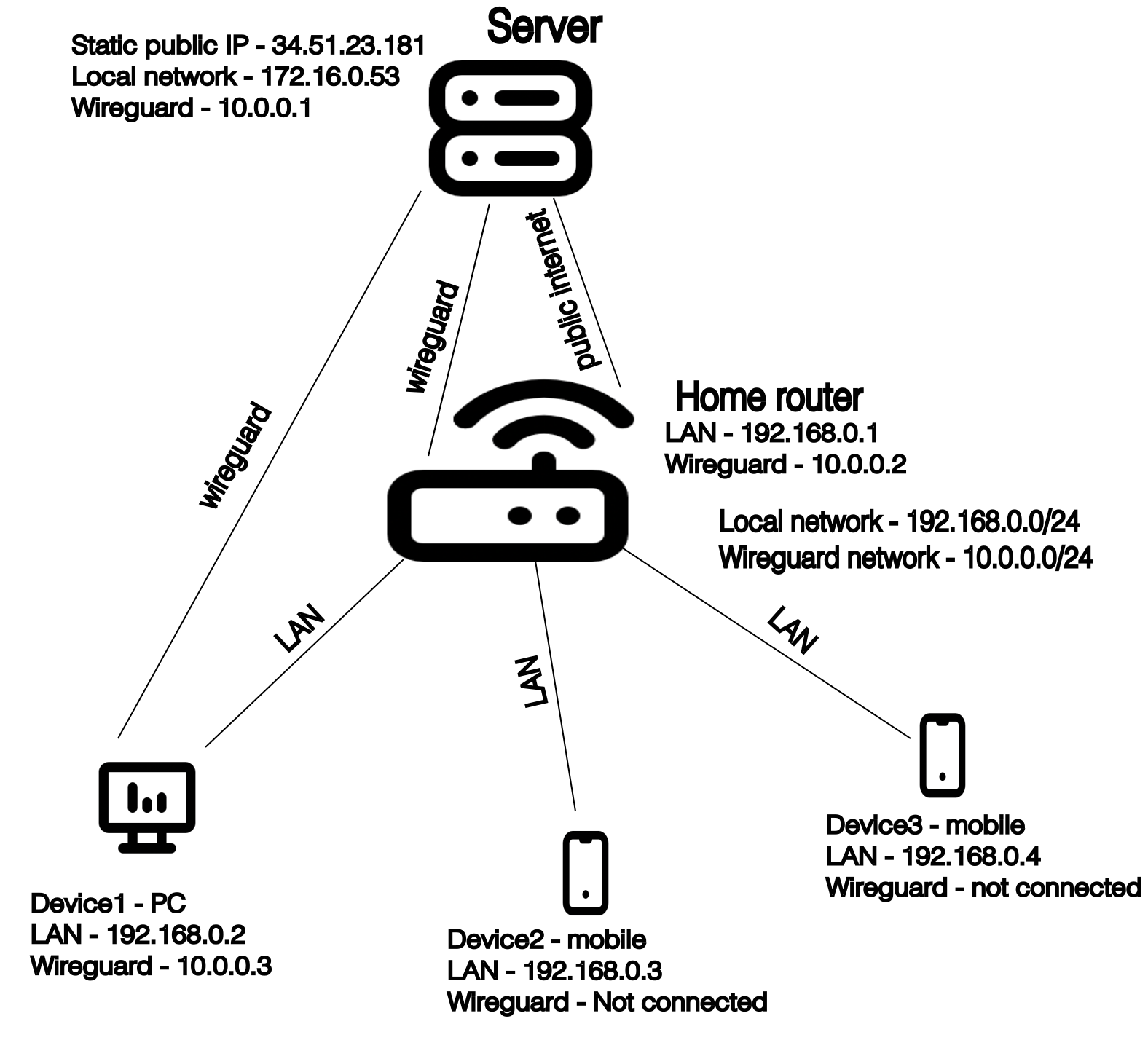
There are two ways how to interconnect VPS and your home network (precisely your home router). First way is with your static public IP address. Unfortunately I do not have static public IP address, and I am not sure if I would be able to setup my router correctly to expose it to the public internet. Latter way is via wireguard VPN. The wireguard is encrypted communication in newly created wireguard local network. So at the end you will have your local network at home and the wireguard network which is also closed network to the public internet network but device on the network are not limited by their location. So you can interconnect safely device from Asia and from Europe for example, VPN = Virtual Private Network. Some device must be a central point with public static IP adress, in our case the VPS has always public IP address. All devices which are connected to this VPN communicate through this central point.
For our purpose the VPS is central point for VPN, but also it is the DNS server itself, so we will not use to interconnect with other device on wireguard VPN network but only to reach the central point of VPN to send request to its Unbound service for resolving domain name.
There is an important thing, for VPN and local home network must be used private IP address blocks, these block or allocation is defined by RFC 1918 - Address Allocation for Private Internets and these blocks must be different otherwise the networks will be in routing conflict.